What Is GlobalProtect? Palo Alto's VPN Client, Explained for Users and IT
GlobalProtect is the remote-access client for Palo Alto Networks firewalls and its Prisma Access cloud service. You install the app, type in (or are pre-configured with) a portal address, sign in, and the app builds an encrypted tunnel to a gateway that lets you reach your organisation's internal systems. It is what your employer, university or county IT team hands you when their network runs on Palo Alto.
Read on if you are a user wondering why the app asks for a portal, why it says your device "is not compliant", or why it will not let you disconnect. IT teams will find the connect methods, HIP behaviour and licensing boundaries in one place. Skip it if you want a consumer VPN for streaming or privacy: GlobalProtect only connects you to the network that issued your login, and that organisation can see the traffic it carries. Choosing a remote-access setup in the first place? Start with our business VPN guide.
What GlobalProtect is
GlobalProtect has three parts, and keeping them apart explains nearly every question about it:
- The app on the endpoint. Palo Alto's administrator's guide lists apps for Windows, macOS, iOS, Android and Linux, and the guide also covers Chromebooks.
- The portal, a service on a Palo Alto firewall (or in Prisma Access) that hands the app its configuration: which gateways exist, how to connect, which settings the user may change.
- One or more gateways, also on firewalls or Prisma Access, which terminate the tunnel and enforce security policy on the traffic inside it.
A small organisation can run the portal and a gateway on the same firewall. A larger one has several external gateways in different regions and internal gateways inside the office network, all described by a single portal.
That design is the main difference from the "server list" model of consumer VPN apps. You never pick a server in GlobalProtect; the portal decides which gateways you may use, and the app chooses among them. It is also why the same app looks different at two employers: almost every visible setting is pushed from the portal.
How it connects: portal, gateway and the tunnel
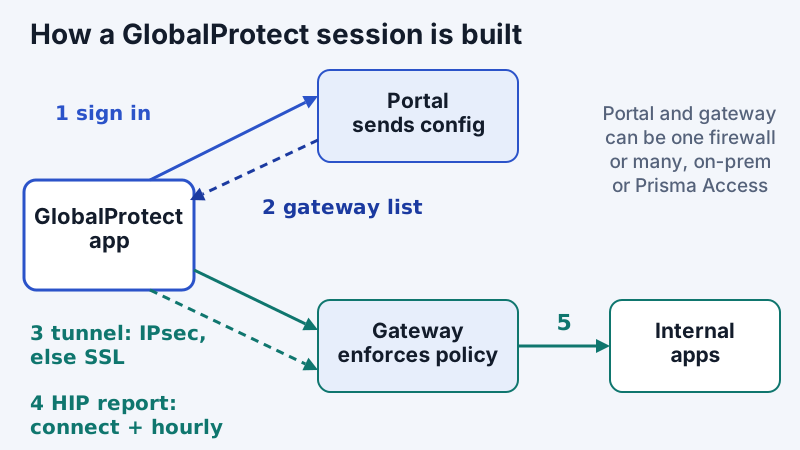
Palo Alto's documentation for the always-on connect method spells out the order. The app "automatically establishes a connection to the portal after the user logs in to an endpoint. The portal responds by providing the app with the appropriate agent configuration. Subsequently, the app sets up a tunnel to one of the gateways specified in the agent configuration."
The tunnel itself uses IPsec when the gateway has it enabled and falls back to SSL (TLS) when IPsec is not available. Since GlobalProtect app 6.3, admins can pin that choice with an "Advanced Control for Tunnel Mode Behavior" setting: the default (IPsec first, SSL fallback), SSL only, SSL with a user override, or IPsec only. In IPsec-only mode, the guide notes, GlobalProtect "stays disconnected and will not fall back to SSL" if the gateway has no IPsec. Users can see which protocol is in use under Settings, Connection in the app.
Two details from the guide explain common support tickets. The app's default tunnel MTU is 1,400 bytes (configurable from 1,000 to 1,420), which matters on networks that fragment large packets. And if source NAT is configured on the same firewall for the client's public IP address, the IPsec tunnel cannot form and the connection falls back to SSL; users then see a fallback notification that is about the firewall's configuration, not their Wi-Fi.
Why the app asks for a portal address
The first-run "Portal" box is simply the app asking where to fetch its configuration. If your IT team has not pre-filled it, you type the address they gave you (often something like vpn.example.org). Admins can avoid the step by pre-deploying the portal address through the Windows Registry, an msiexec parameter or a macOS plist, and can lock the field by setting "Allow User to Change Portal Address" to No. If your app shows an empty portal box, you are not doing anything wrong; you just need that one address.
Always-on, pre-logon and on-demand modes
Every GlobalProtect deployment chooses a connect method per agent configuration, and that choice determines whether the user can turn the VPN off at all. The administrator's guide lists four:
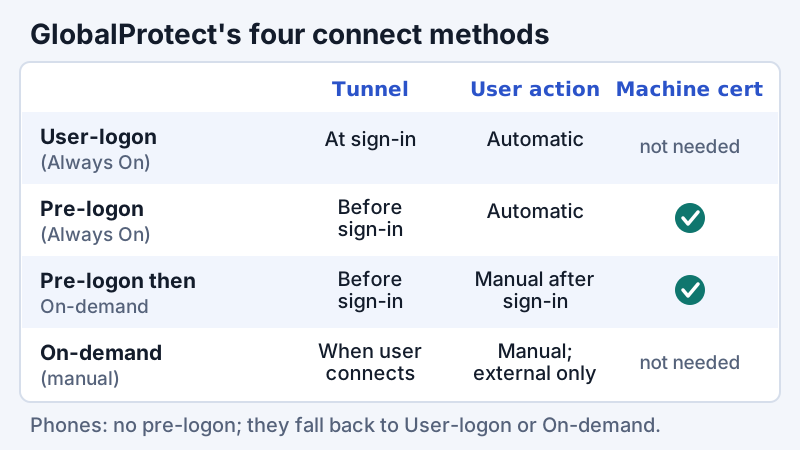
- User-logon (Always On). The app connects to the portal as soon as the user logs in to the device. With single sign-on on Windows, the GlobalProtect login is invisible to the user. The guide warns that on iOS this method stops one-time-password apps working, because GlobalProtect forces all traffic through the tunnel.
- Pre-logon (Always On). The app authenticates the device and builds the tunnel before anyone logs in, using a machine certificate that IT must pre-deploy through an external PKI. It is the method to choose when a remote Windows laptop has to reach the corporate network before anyone signs in.
- Pre-logon then On-demand. The same pre-logon tunnel, but after sign-in the user has to launch the connection manually.
- On-demand (manual user-initiated). The user opens the app and connects when needed. Palo Alto says to use this method "for external gateways only".
Mobile devices do not support pre-logon. Per Palo Alto's PAN-OS help, a phone given Pre-logon (Always On) behaves as User-logon (Always On), and one given Pre-logon then On-demand behaves as On-demand.
A separate portal setting decides what happens when the tunnel is down. With Enforce GlobalProtect Connection for Network Access set to Yes, Palo Alto's help says the setting forces "all network traffic to traverse a GlobalProtect tunnel", blocking everything until the app reaches a gateway. With the default, No, users can browse the internet when GlobalProtect is disabled or disconnected. If your laptop has no internet until GlobalProtect connects, this is why, and it is deliberate.
HIP checks: why it says your device isn't compliant
HIP (Host Information Profile) is GlobalProtect's posture check. The app collects information about the device and sends it to the gateway; the gateway compares it with HIP objects and profiles the admin defined and applies whichever security rules match. Palo Alto's examples of what HIP can look at include whether the latest security patches and antivirus definitions are installed, whether disk encryption is enabled, whether the device is jailbroken or rooted, and whether required software is running.
The timing matters when you are trying to fix a failure. According to the administrator's guide, HIP checks run when the app connects to the gateway and then hourly while it stays connected, and the gateway keeps only the most recent report per device. So after you install the missing update or turn on encryption, reconnecting is usually faster than waiting for the next hourly check.
The pop-up text users see is written by their own IT team. Admins configure HIP notifications per profile, as a "Match Message" or a "Not Match Message", which is why one organisation's message names the exact missing patch and another's just says "non-compliant". If the message is vague, the HIP Match log on the firewall shows which profile failed.
HIP is also a licensing line. Palo Alto's licence page says no GlobalProtect licence is needed for basic remote access through one or more internal or external gateways. A GlobalProtect Gateway licence is required on each firewall that performs HIP checks, supports the mobile, Linux or IoT apps, provides IPv6 connections, splits tunnels by destination domain, application or video streaming, or quarantines compromised devices.
Common errors and fixes
GlobalProtect's messages are short, and the same text can have several causes. The table maps the ones users most often search for to their usual explanation; the GlobalProtect logs on the firewall (and PanGPS.log on the client) are the authority for any single case.
| Message or symptom | Usual meaning | Who can fix it | First thing to check |
|---|---|---|---|
| Portal box is empty or "could not connect to portal" | No portal address, a mistyped one, or DNS/network blocking the portal | User, then IT | Confirm the exact address with IT; try a phone hotspot |
| "Matching client config not found" | Your user, group or OS matches no agent configuration on the portal or gateway (community answers) | IT | The agent config's user/group and OS criteria |
| "Required client certificate is not found" | The device lacks the client certificate the portal or gateway requires, or it is in the wrong store | IT | Whether the machine or user certificate was deployed |
| Notice that IPsec fell back to SSL | IPsec could not form, for example because of source NAT on the same firewall (admin guide) | IT | Gateway IPsec setting and NAT rules |
| HIP "not compliant" message | A HIP profile in a security rule did not match your device | User, with IT's message | The item named in the message: patches, antivirus, encryption |
| No internet until GlobalProtect connects | Enforce GlobalProtect Connection for Network Access is set to Yes | IT policy | Connect; it is intended behaviour |
Two habits shorten most of these. Try a second network before anything else: if the app connects over a phone hotspot, the problem is the local network, not your account. And note the exact wording and time of the error before calling the help desk, because the firewall's GlobalProtect logs are searchable by user and time.
Security: the gateway is the target
As with every VPN platform, the internet-facing gateway attracts attackers far more than the app does. CISA's Known Exploited Vulnerabilities catalogue includes CVE-2024-3400, a command injection in PAN-OS's GlobalProtect feature that let an unauthenticated attacker run commands as root on the firewall (added 12 April 2024), and CVE-2019-1579, remote code execution on PAN-OS with a GlobalProtect portal or gateway enabled (added 10 January 2022). Its most recent Palo Alto entry is CVE-2026-0257, which CISA describes as a PAN-OS authentication bypass that lets attackers "establish an unauthorized VPN connection" (added 29 May 2026). CISA marks all three as known to be used in ransomware campaigns.
The defensive routine is the one we recommend for every gateway in our remote access VPN brief: apply PAN-OS hotfixes on Palo Alto's advisory timeline, keep the management interface off the internet, require MFA (the portal and gateway can use different authentication profiles, so the most sensitive gateways can demand a second factor), and prefer per-application access where you can. Fortinet's gateways have the same pattern of exploited flaws, which we cover in the FortiClient brief.
GlobalProtect vs other enterprise clients
The client follows the firewall. Nobody standardises on GlobalProtect without Palo Alto gateways or Prisma Access, just as FortiClient follows FortiGate. So the useful comparison is between architectures:
- Palo Alto with GlobalProtect. Mature posture checks (HIP), pre-logon for domain-joined Windows, and the same policy engine for remote and office users. Advanced features sit behind the gateway licence noted above.
- Fortinet with FortiClient. Comparable model; Fortinet has now moved remote access to IPsec on every FortiGate model, as covered in our FortiClient brief.
- Microsoft's built-in options. Windows ships its own Always On VPN client, and Microsoft markets Entra Private Access as a VPN replacement. Both make sense if identity already lives in Entra ID.
- Managed business VPN or ZTNA services. For teams without a firewall estate, a hosted service replaces the gateway you would otherwise patch. NordLayer is one such service we link to (affiliate link; see our affiliate disclosure); evaluate it on identity integration, gateway locations and logging terms like any other.
If the real question is "VPN or zero trust?", our zero trust vs VPN brief explains why network-level access and per-application access solve different problems, and our IPsec vs SSL VPN comparison covers the two tunnel types GlobalProtect switches between.
Edge cases worth knowing
- Personal devices. Installing GlobalProtect on a personal laptop is common for universities. HIP may still inspect the device's patch and antivirus state if your institution uses it, so read the acceptable-use terms you were given.
- Split tunnelling. Whether Zoom, Teams or streaming bypasses the tunnel is an admin decision. Splitting by domain, application or video-streaming traffic requires the gateway licence. Our split tunneling brief covers the trade-offs.
- Disable options. For user-logon (always-on) configurations, the admin guide gives IT five choices for "Allow User to Disable GlobalProtect App": Allow (the default), Disallow, allow with a reason, allow with a passcode, or allow with a ticket the help desk issues. A passcode prompt is policy, not a fault; ask IT rather than uninstalling.
- Two VPN clients at once. Running a consumer VPN alongside GlobalProtect usually breaks one of them, because both want the default route and DNS. Turn the other one off while you work.
- Linux and mobile. Both need the gateway licence on the firewall side, so an organisation without it may support only Windows and macOS.
The bottom line
GlobalProtect is the client half of a Palo Alto remote-access design. The portal tells the app what to do, the gateway carries and polices the traffic, and HIP decides whether your device is healthy enough to get in. If it asks for a portal, get the address from IT; if it says you are not compliant, fix the named item and reconnect; if it will not let you disconnect, that is an always-on policy working as designed. For IT, the work is on the firewall: pick the connect method deliberately, license the gateway for the features you use, and patch PAN-OS on Palo Alto's schedule.
GlobalProtect VPN: frequently asked questions
What is GlobalProtect VPN used for?
Is GlobalProtect free?
What is a GlobalProtect portal address?
Can I turn off GlobalProtect?
Why does GlobalProtect say my device is not compliant?
Start with the business VPN guide, or read how IPsec VPNs work in detail.