Always On VPN in 2026: Device Tunnel vs User Tunnel, and What Microsoft Pushes Next
Always On VPN is Microsoft's built-in remote-access VPN for Windows: a VPN profile, pushed by Intune or another management tool, that connects a laptop to the corporate network automatically. It comes in two flavours, a device tunnel that connects before anyone signs in and a user tunnel that connects after sign-in, and both terminate on a VPN gateway you run, typically Windows Server's Routing and Remote Access (RRAS) or a third-party IKEv2 appliance. In 2026 it is still a supported, documented Microsoft technology. It is also no longer where Microsoft puts its marketing: that is Microsoft Entra Private Access, sold as a VPN replacement.
This brief is for IT admins who run Always On VPN, inherited it, or are deciding whether to deploy it at all. It covers how the two tunnels differ, the requirements people trip over, Microsoft's direction of travel, and a practical way to decide whether to stay or move. If you arrived looking for the "always-on VPN" switch on an Android phone or in a consumer VPN app, that is a different feature with the same name: a setting that keeps one VPN app permanently connected.
What Always On VPN is
Always On VPN is the successor to DirectAccess, and Microsoft says so directly. Its list of deprecated Windows features (June 2024 entry) reads: "DirectAccess is deprecated and will be removed in a future release of Windows. We recommend migrating from DirectAccess to Always On VPN."
Unlike DirectAccess, it is not tied to Active Directory. Microsoft's overview says it supports domain-joined, workgroup and Microsoft Entra ID-joined devices, and that it "is available in all Windows editions". Configuration is a standard XML profile (ProfileXML) deployed with PowerShell, Configuration Manager, Intune, Windows Configuration Designer or a third-party MDM.
Three properties make it attractive to Windows-centric teams:
- No extra client. The VPN client is part of Windows. Third-party gateways can still be used through IKEv2, or through UWP VPN plug-ins; Microsoft lists plug-ins for Pulse Secure, F5 Access, Check Point Capsule VPN, FortiClient, SonicWall Mobile Connect and GlobalProtect.
- Automatic triggering. Connections can start when a particular app launches or a corporate DNS name is queried, and trusted network detection stops the VPN connecting when the laptop is already on the office network.
- Conditional access. With Microsoft Entra conditional access, Entra ID issues "a short-lived (by default, sixty minutes)" IPsec authentication certificate to compliant devices, which the gateway then accepts. Non-compliant devices simply cannot get a valid certificate.
The connection path is classic VPN. Per Microsoft's description, the client resolves the gateway's address in public DNS, connects, and the gateway (acting as a RADIUS client) passes the request to a Network Policy Server, which authenticates and authorises it. If you are new to that model, our remote access VPN brief covers the moving parts.
Device tunnel vs user tunnel
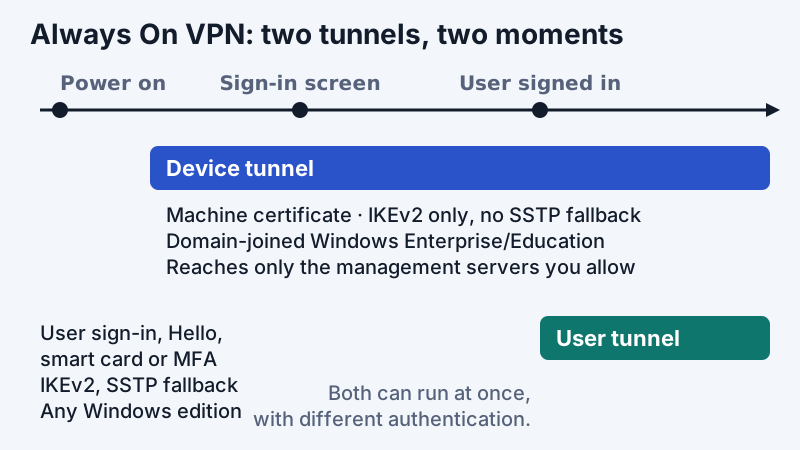
The two tunnels are separate VPN profiles. Microsoft's overview says they "operate independently with their VPN profiles, can be connected at the same time, and can use different authentication methods and other VPN configuration settings as appropriate."
The user tunnel is the ordinary one. It "only connects after a user logs on to the device", authenticates the user (certificates, Windows Hello for Business, smart cards, or username and password with MFA through RADIUS), and carries whatever the routing policy sends: either everything (force tunnel) or only corporate prefixes (split tunnel).
The device tunnel exists for the moments before anyone signs in. It "allows the VPN to establish connectivity before user sign-in", so a remote laptop can reach the management systems you allow while it sits at the Windows sign-in screen. It is deliberately narrow:
- It can only be configured on "domain-joined devices running Windows 10 Enterprise or Education version 1709 or later".
- It supports IKEv2 only, "with no support for SSTP fallback".
- It authenticates with a machine certificate.
- "There's no support for third-party control of the Device Tunnel", so it has to terminate on a gateway that speaks standard IKEv2.
Microsoft's documentation pairs the device tunnel with traffic filters that limit it to the management systems it needs. One side effect to know: with traffic filters turned on, the device tunnel "denies inbound traffic (from the corporate network to the client)", which matters if your help desk relies on connecting into laptops remotely.
| Feature | Device tunnel | User tunnel | Entra Private Access (Quick Access) |
|---|---|---|---|
| Connects | Before sign-in | After a user signs in | Through the Global Secure Access client, for assigned users |
| Protocols | IKEv2 only | IKEv2, with SSTP fallback | Client tunnels to Microsoft's edge; TCP and UDP segments |
| Authentication | Machine certificate | User certificate, Windows Hello, smart card or EAP/RADIUS with MFA | Entra ID with Conditional Access |
| Devices | Domain-joined Windows Enterprise or Education | Any Windows edition, domain, workgroup or Entra-joined | Windows, macOS, iOS and Android clients |
| Your infrastructure | IKEv2 gateway (RRAS or third party) | IKEv2/SSTP gateway plus NPS | Private Network Connector inside the network |
| Licence | Included in Windows | Included in Windows | Entra Private Access or Entra Suite, plus Entra ID P1 or P2 |
Requirements and limits that bite
Most failed Always On VPN projects stumble on the same few points, and all of them are in Microsoft's documentation rather than hidden.
Edition and join type for the device tunnel. Windows Pro machines get the user tunnel but not the device tunnel. If your laptops are Entra-joined but not domain-joined, the device tunnel is not available either; for many cloud-first organisations that removes the main reason they wanted Always On VPN.
Certificates everywhere. IKEv2 with machine and user certificates means a working PKI, auto-enrolment and a plan for renewal and revocation. Conditional access shortens the user certificate's life to about an hour by default, which is good for security and unforgiving of broken enrolment.
Protocol reachability. IKEv2 needs UDP 500 and 4500 open on the path. The user tunnel can fall back to SSTP (TLS on TCP 443) on restrictive networks; the device tunnel cannot. A laptop on a guest network that blocks UDP 4500 will therefore sign in without corporate connectivity, even though the user tunnel later works. Our IPsec explainer covers why NAT traversal uses those ports.
The gateway is yours to run. RRAS scales and clusters, Microsoft notes, with NPS load balancing and geographic resilience through DNS or Azure Traffic Manager, but someone has to size, patch and monitor it. Gateway sizing is the same exercise covered in our VPN concentrator brief.
Split vs force tunnel. Always On VPN supports per-app routing policies and exclusion routes, but Microsoft notes exclusion routes "only work in a Split Tunnel setup". Decide the tunnelling model first; our split tunneling brief covers the trade-offs.
Microsoft's direction: Global Secure Access
Global Secure Access is Microsoft's umbrella name for its Security Service Edge products, and the remote-access half is Microsoft Entra Private Access. Microsoft's overview describes it as giving users access to private apps "without requiring a VPN" and offering "per-app adaptive access based on Conditional Access policies, for more granular security than a VPN." Its concept page goes further, calling it "a quick and easy way to replace your VPN".
The migration path Microsoft documents starts with Quick Access, which publishes whole IP ranges or FQDN patterns so access stays the same as on the VPN. The traffic path is: device, Global Secure Access client, Microsoft's service edge, a Private Network Connector you install inside the network, then the internal resource. Microsoft's tutorial (dated March 2026) calls Quick Access "a migration bridge" and recommends moving high-value apps to per-app segments afterwards. Two operational notes from that tutorial: users must be assigned directly or through a group (nested groups are not supported), and the client pulls its ruleset every five minutes.
Licensing is the other difference. Always On VPN is part of Windows and Windows Server. Entra Private Access is included in the Microsoft Entra Suite or sold standalone, and Microsoft says users also need Microsoft Entra ID P1 or P2.
Microsoft does not describe Private Access as Always On VPN's official successor on the pages we read, and Always On VPN is not on Microsoft's list of deprecated Windows Server features (last updated March 2026). Microsoft still documents Always On VPN for Windows Server 2025. The fair summary: Always On VPN is supported and maintained; Entra Private Access is where new investment and marketing are going.
Should you migrate?
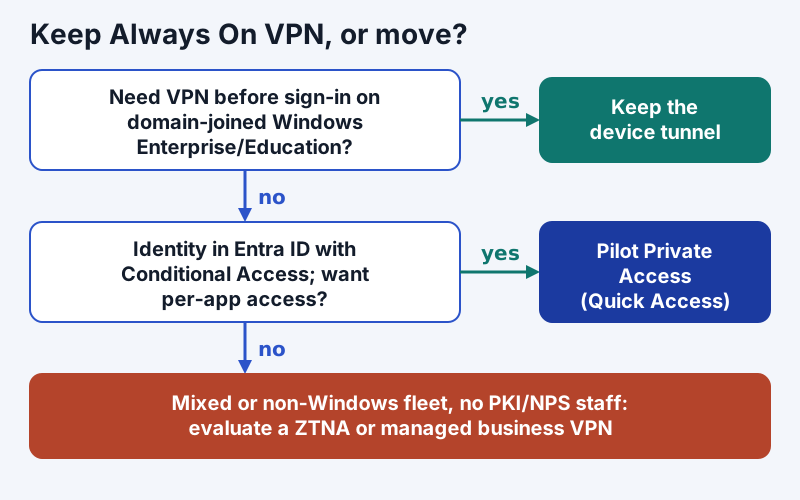
The answer depends less on which product is newer than on what your estate looks like.
Keep Always On VPN if your laptops are domain-joined Windows Enterprise or Education, you rely on the device tunnel for logon-time connectivity, you already run PKI and NPS, and the RRAS gateways are healthy. It costs no extra licences and it works.
Pilot Entra Private Access if identity already lives in Entra ID, Conditional Access is mature, many devices are Entra-joined (so the device tunnel never applied to them), or you have macOS and mobile users the Windows-only tunnel cannot cover. Start with Quick Access mirroring your VPN's address ranges, watch the application discovery data, then carve out per-app segments. Before you switch anything off, test whether your logon-time scenarios (first sign-in, password reset at the lock screen, Group Policy) still work on the new path, because those are exactly what the device tunnel did.
Look outside Microsoft if your fleet is mixed, Windows is a minority, or you lack the staff to run PKI, NPS and gateways. Managed business VPN and ZTNA services move the gateway out of your data centre. NordLayer is one we link to (affiliate link; see our affiliate disclosure); judge any service by identity integration, where its gateways sit, and what it logs. Self-hosted WireGuard remains a free option for technical teams; see WireGuard for business.
Whichever way you go, the architectural question underneath is network access versus application access. Our zero trust vs VPN brief explains why ZTNA narrows the blast radius but does not replace site-to-site links or full-tunnel egress inspection.
Edge cases worth knowing
- Windows 11. Microsoft's device-tunnel note still names Windows 10 Enterprise or Education 1709 or later; current Windows 11 Enterprise and Education builds are the practical equivalent, but test before you commit a rollout plan to it.
- Third-party gateways. IKEv2 interoperability is supported, but Microsoft advises consulting your gateway vendor on Always On VPN and device-tunnel compatibility. If you set custom IPsec cryptography in the ProfileXML, agree it with the gateway's configuration first.
- Coexisting with another VPN client. Running Always On VPN alongside a vendor client such as FortiClient or GlobalProtect invites route and DNS conflicts. Pick one per profile, or use that vendor's UWP plug-in inside Always On VPN.
- DirectAccess leftovers. If DirectAccess is still deployed, Microsoft's stated path is Always On VPN; there is no reason to start a new DirectAccess deployment.
- Name resolution. Always On VPN can assign DNS suffixes and use Name Resolution Policy Table rules; Microsoft warns that global suffixes interfere with short-name resolution when NRPT is in use.
The bottom line
Always On VPN gives Windows fleets an automatic, built-in VPN with two tunnels: a device tunnel for logon-time connectivity on domain-joined Enterprise and Education machines, and a user tunnel for everything after sign-in. It remains supported and documented in 2026, it replaces DirectAccess, and it costs nothing beyond the infrastructure you run. Microsoft's new remote-access effort is Entra Private Access, which trades your gateways for Microsoft's edge and per-app Conditional Access, at an added licence cost. Keep Always On VPN where the device tunnel earns its place; pilot Private Access where identity is already in Entra and the device tunnel never applied.
Always On VPN: frequently asked questions
What is Always On VPN?
What is the difference between the device tunnel and the user tunnel?
Is Always On VPN deprecated?
What replaces Always On VPN?
Does Always On VPN work on Windows Pro?
Start with the business VPN guide, or read how IPsec VPNs work in detail.