What Is FortiClient? The Free VPN-Only Client, EMS and the SSL-VPN Change
FortiClient is Fortinet's endpoint agent: software that runs on a laptop or phone and, in Fortinet's words, "delivers protection, compliance, and secure access in a single, modular lightweight client". Its best-known part, FortiClient VPN, connects that device to a FortiGate firewall over an encrypted tunnel. The free "VPN-only" build does that one job (IPsec or SSL VPN, with certificate and FortiToken MFA support) and nothing else; the licensed product, managed from Fortinet's EMS server, adds endpoint security, compliance checks and zero-trust telemetry. When people say "Fortinet VPN", they usually mean that pairing: a FortiGate firewall at the organisation's end and the FortiClient app on yours. If your employer or university runs FortiGate firewalls, this is almost certainly the software they will ask you to install.
Who needs this brief: IT teams running FortiGate remote access, and users who were handed a FortiClient installer and want to know what it is. Who can skip it: anyone shopping for a personal privacy VPN. FortiClient connects you to an organisation's network; on its own it does not hide your browsing from anyone or give you servers in other countries.
The biggest change to know about in 2026 is on the firewall side, not the client. From FortiOS 7.6.3, SSL-VPN tunnel mode is gone on every FortiGate model and Fortinet points customers to IPsec instead. A large share of "FortiClient is broken" tickets after an upgrade trace back to that one decision.
What FortiClient is, in one paragraph
As an endpoint agent, FortiClient's best-known job is remote access: it authenticates the user to a FortiGate, negotiates a tunnel and routes corporate traffic through it. Everything else it can do (antivirus, web filtering, vulnerability scanning, posture checks for ZTNA) depends on a licence and on the endpoint being registered with FortiClient EMS, the Endpoint Management Server. That split explains most of the confusion online: "FortiClient" can mean a free tunnel client one person downloads, or a fleet-managed security agent that thousands of laptops report into.
The FortiGate decides almost everything about the connection. The gateway address, the port, whether you use IPsec or SSL VPN, the authentication method and which networks you can reach are all set by whoever administers the firewall. The client mostly needs the right profile and a valid login. That is why "which settings should I use?" has no generic answer: you use the ones your IT team publishes.
Editions compared: VPN-only (free) vs licensed with EMS
Fortinet's download page lists FortiClient VPN-only as a free download for Windows (x64 and ARM), macOS, iOS, Android and Linux (.deb and .rpm, including ARM builds). The same page tells VPN-only users to "upgrade to one of the Enterprise tiers for Support, central management, zero trust posture assessment, and more." It also lists a paid Standalone Edition, which Fortinet describes as an entry-level commercial tier for small deployments that do not run EMS, with MFA support, a FortiIdentity Cloud Basic subscription and email technical support.
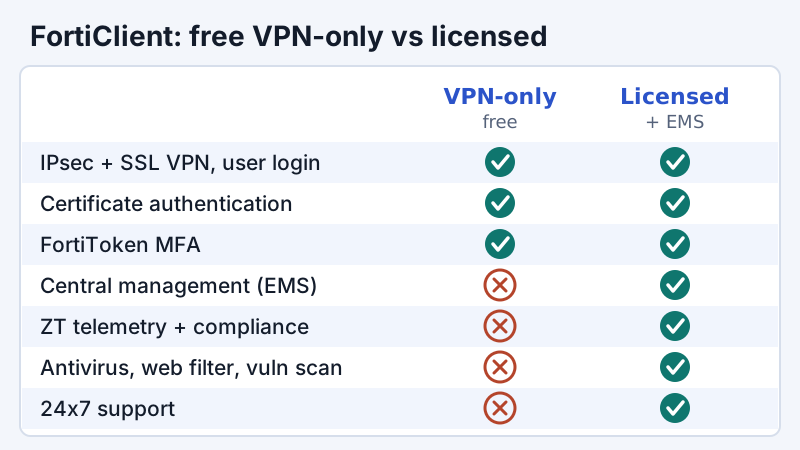
Fortinet's own feature comparison (FortiClient 7.2.6 administration guide) describes remote access in the free build as "limited". What it keeps is the part most users need:
- IPsec and SSL VPN with user authentication.
- Certificate authentication.
- Multifactor authentication using FortiToken.
What it drops is everything that makes FortiClient an endpoint security product: zero trust telemetry, compliance, sandbox detection, antivirus, web filter, application firewall, vulnerability scan, central management and 24x7 support are all marked "No" for the free build. Fortinet's community knowledge base adds the support position plainly: the free client does not carry the normal FortiClient technical-support entitlement. Tickets about VPN issues can still be raised against the FortiGate's serial number, but a fault isolated to the free endpoint is not covered.
Is the free FortiClient being discontinued?
Not according to Fortinet's own release notes, but it is no longer being updated in step with the main product. The FortiClient (Windows) 7.4.7 release notes carry a special notice headed "No new version of VPN-only agent". It says versions 7.4.4 to 7.4.7 do not include a new free VPN-only agent because no feature updates were made, and that users "can continue to use the FortiClient (Windows) 7.4.3 free VPN-only agent." Several blogs read that as the end of the free client; the notice itself does not say so. The practical consequence for IT is simpler: if your fleet relies on the free Windows build, it is pinned to 7.4.3 while licensed clients move on, so watch Fortinet's PSIRT advisories for that version specifically.
The same 7.4.7 notes contain a second notice that does break connections: "Starting from 7.4.4, FortiClient (Windows) does not support IKEv1 for IPsec VPN." Licensed Windows clients on 7.4.4 or later therefore need an IKEv2 gateway configuration. If an old dial-up tunnel still uses IKEv1 (aggressive mode with a pre-shared key is the usual suspect), it stops working after the client update, not after a firewall change.
SSL-VPN vs IPsec in FortiClient, and what Fortinet changed
FortiClient has always supported both remote-access families a FortiGate offers. SSL VPN wraps traffic in TLS on port 443, which is why it got through hotel and conference Wi-Fi so easily. IPsec uses IKE on UDP 500 and NAT traversal on UDP 4500, the standard path covered in our IPsec explainer. The general trade-offs are in IPsec vs SSL VPN; what matters here is that Fortinet has now made the choice for its customers.
The change came in two steps, both documented in FortiOS release notes:
- FortiOS 7.6.0: on FortiGate models with 2 GB of RAM or less, "the SSL VPN web and tunnel mode feature will no longer be available from the GUI or CLI." The listed models are the 40F, 60F and 61F families (including their Wi-Fi variants) and the rugged FGR-60F.
- FortiOS 7.6.3: SSL VPN tunnel mode is replaced with IPsec VPN on all FortiGate models. Fortinet's notice says the IPsec replacement "can be configured to use TCP port 443", that tunnel mode is no longer available in the GUI or CLI, and that "settings will not be upgraded from previous versions."
Web mode survives in a reduced form. FortiOS 7.6.3 renames it Agentless VPN: browser-based access to internal web resources with no client tunnel. Even that is unavailable on the 40F, 60F, 61F, FGR-60F (2 GB) and 90G/91G models, where Fortinet's advice is to move remote access to IPsec dial-up VPN. You can check whether a unit falls under the memory rule with `diagnose hardware sysinfo conserve`; Fortinet's threshold is total RAM below 2,000 MB.
Settings are not migrated. A FortiGate upgraded to 7.6.3 with SSL-VPN tunnel-mode users still configured simply loses that configuration. Build and test the IPsec dial-up replacement, and push the matching FortiClient profiles, before you upgrade the firewall.
The IPsec-over-TCP-443 option matters more than it sounds. The old argument for SSL VPN was that UDP 500/4500 is blocked on some guest networks while TCP 443 almost never is. Running IKEv2 over TCP 443 keeps that reachability without keeping the SSL-VPN daemon exposed. Expect some throughput cost compared with IPsec over UDP, because TCP-in-TCP retransmission behaves badly on lossy links, so it is worth offering UDP first and TCP 443 as the fallback where your design allows it.
Common errors and what they mean
Most FortiClient errors are the FortiGate rejecting something, reported through a number and a progress percentage. The percentage tells you how far the handshake got, which is often more useful than the message text. The table below covers the codes Fortinet documents in its own knowledge base and admin guides; for anything else, the FortiGate's `diagnose debug application sslvpnd -1` and `diagnose debug application fnbamd -1` output (or `ike -1` for IPsec) is where the real reason is logged.
| Symptom | Where it stops | Documented cause | What to check |
|---|---|---|---|
| "Unable to establish VPN connection. The VPN server may be unreachable (-6005)" | 40% | Fortinet KB: FortiClient sent the SAML login request twice; FortiGate debug shows "wrong vdom (0:0) or time expired" | Raise remote auth timeout (set remoteauthtimeout 60), sync client and FortiGate clocks, update to FortiClient 7.2.4 or later |
| "Credential or SSLVPN configuration is wrong (-7200)" | 48% | Wrong client certificate selected (FortiClient 7.2 admin guide) | Run fnbamd debug; check the CA is on the FortiGate and FortiClient presents a machine, not user, certificate |
| "Credential or SSLVPN configuration is wrong (-7200)" | After a FortiOS 7.6.3 upgrade | Tunnel mode disabled on the SSL-VPN portal (Fortinet KB) | Tunnel mode is gone in 7.6.3; move users to IPsec dial-up rather than chasing the portal setting |
| "Credential or SSLVPN configuration is wrong (-7200)" | Any | Weaker SSL cipher on the SSL-VPN settings than in the authentication rule (Fortinet KB, Dec 2025) | Align cipher settings; also confirm username, password and realm |
| IPsec tunnel never comes up on Windows | IKE phase 1 | FortiClient (Windows) 7.4.4+ dropped IKEv1 | Rebuild the dial-up tunnel as IKEv2 on the FortiGate |
Two practical habits save most of the time spent on these. First, test from a second network (a phone hotspot) before touching the configuration: if FortiClient connects there, the problem is the local network, not the profile. Second, check the client's clock. Certificate checks and SAML assertions are time-sensitive, and a laptop that has drifted by several minutes produces errors that look like authentication failures.
Security track record: why patching the FortiGate matters
FortiClient itself is rarely the weak point. The internet-facing SSL-VPN service on the FortiGate is. CISA's Known Exploited Vulnerabilities (KEV) catalogue, which lists flaws confirmed as exploited in the wild, includes at least seven Fortinet SSL-VPN-related CVEs. Four are worth knowing by number, because they show up in incident reports and audit findings:
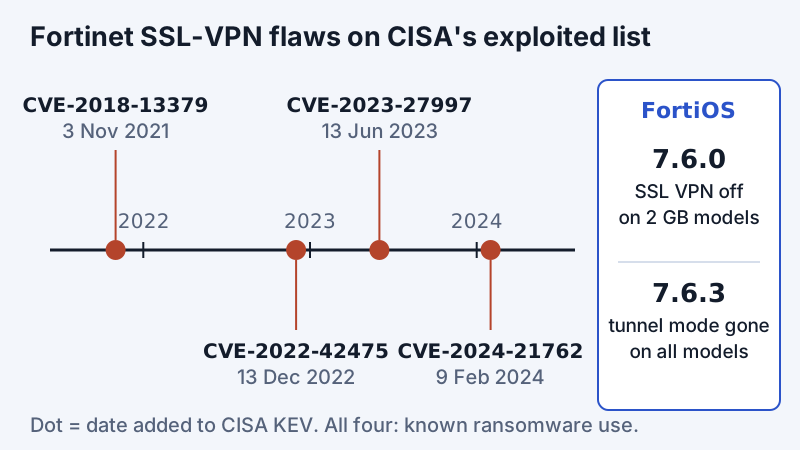
- CVE-2018-13379, an SSL VPN web-portal path traversal that lets an unauthenticated attacker download system files. It was in the first batch when the KEV catalogue launched on 3 November 2021.
- CVE-2022-42475, a heap-based buffer overflow in FortiOS SSL-VPN allowing unauthenticated remote code execution, added 13 December 2022.
- CVE-2023-27997, another SSL-VPN heap overflow in FortiOS and FortiProxy, added 13 June 2023.
- CVE-2024-21762, an out-of-bounds write in FortiOS exploitable with crafted HTTP requests, added 9 February 2024.
CISA marks all four as known to have been used in ransomware campaigns. The management side has its own entries too: FortiClient EMS, the server that manages licensed clients, has three CVEs on KEV, including CVE-2023-48788 (SQL injection, added 25 March 2024). Those affect the EMS server, not the free VPN-only client, but they are a reason to keep EMS off the open internet.
None of this makes Fortinet unusual. Palo Alto's GlobalProtect, Cisco's ASA and others have their own KEV entries, because any VPN gateway reachable from the internet is a prime target. The lesson is operational: patch the gateway on the vendor's advisory timeline rather than your normal change window, expose as little of the management interface as possible, enforce MFA, and treat the SSL-VPN removal as a security improvement as much as an inconvenience. A remote-access design that grants per-application access instead of network access shrinks the damage when a gateway does get hit; our zero trust vs VPN brief covers that trade-off.
Planning the move from SSL VPN to IPsec
If you still run SSL-VPN tunnel mode on FortiOS 7.4 or an early 7.6 release, the decision has effectively been made for you; the question is only when. A sensible order of work:
- Inventory. List which user groups, portals and address pools use tunnel mode, and which only use web mode bookmarks. Web-mode users may be served by Agentless VPN on larger models.
- Build the IPsec dial-up tunnel in parallel. Use IKEv2, certificate or SAML/MFA authentication, and enable the TCP 443 transport option if your users sit behind restrictive networks. Keep the address pool and firewall policies equivalent to what SSL VPN granted, then tighten them.
- Update clients. Push FortiClient profiles for the new tunnel (through EMS if you have it). Remember the free Windows VPN-only agent stops at 7.4.3, and licensed Windows clients from 7.4.4 cannot use IKEv1.
- Pilot from hostile networks. Test from a hotel-style captive portal and a phone hotspot, not only from home broadband.
- Upgrade FortiOS last. Only once every tunnel-mode user has a working IPsec profile.
Split tunnelling decisions carry over unchanged in principle; see VPN split tunneling if you are revisiting what should and should not go through the tunnel while you rebuild.
Alternatives IT teams evaluate
FortiClient makes sense because you chose FortiGate; it is rarely chosen on its own merits. Teams reconsidering remote access usually compare four directions, and the right one depends on what you are connecting rather than on the client's interface.
- Stay on FortiGate, move to IPsec or ZTNA. Lowest disruption. Licensed FortiClient with EMS adds posture checks and Fortinet's ZTNA, which narrows access to named applications.
- Another firewall vendor's client. Palo Alto GlobalProtect and Cisco Secure Client are the usual comparisons. They tie you to that vendor's gateways in the same way.
- A cloud business VPN or ZTNA service. For smaller teams without a firewall estate, a managed service can replace the gateway entirely. NordLayer and Proton VPN for Business are two options; both are run for you, which removes the gateway-patching burden but adds a vendor you have to trust with the traffic path.
- Self-hosted WireGuard or a mesh built on it. Small, auditable, and free; it suits engineering teams comfortable running it. The WireGuard for business brief covers the operational catch.
Whatever you pick, the criteria are the ones in our business VPN guide: how identity and MFA plug in, how the gateway is patched, whether you need network-level or application-level access, and who has to support the client on several hundred laptops.
Edge cases worth knowing
- Personal devices. The free VPN-only client works on personal laptops, which is why universities hand it out, but it reports nothing back to IT. If your policy requires a posture check before access, you need the licensed client with EMS, or a ZTNA design.
- Linux. The download page lists Linux packages for the VPN-only build. Fortinet's 7.2.6 guide notes that FortiClient (Linux) supports only IKEv2 for IPsec, which suits the post-7.6.3 world anyway.
- iOS and Android. Mobile apps exist in the App Store and Google Play. Feature parity with desktop varies by version, so test the exact authentication method (SAML, certificates) on mobile before rolling it out.
- Multiple VPN clients on one laptop. Contractors often carry FortiClient alongside another vendor's client. Two clients fighting over the routing table or DNS is a common cause of "connected but nothing loads"; disconnect and quit the other client first.
- "Is FortiClient a privacy VPN?" No. It sends your traffic to your organisation's firewall, which can log and inspect it under that organisation's policy.
The bottom line
FortiClient is the client end of a FortiGate remote-access design, and in 2026 that design means IPsec. The free VPN-only build is still available and does the tunnelling job with MFA, but it comes without support, central management or posture checks, and the Windows build is frozen at 7.4.3. On the firewall, FortiOS 7.6.3 removed SSL-VPN tunnel mode for every model and migrates none of its settings, so plan the IPsec move before the upgrade, not after. Patch the FortiGate on Fortinet's advisory schedule: the gateway, not the client, is where the published exploits land.
FortiClient VPN: frequently asked questions
What is FortiClient?
What is FortiClient VPN used for?
Is FortiClient VPN free?
What is FortiClient VPN-only IPsec?
Why is FortiClient VPN not connecting?
Is Fortinet getting rid of SSL VPN?
Start with the business VPN guide, or read how IPsec VPNs work in detail.