What Is a Corporate VPN? What It Does, and What Your Employer Can See
A corporate VPN is the encrypted connection your employer gives you to reach its internal systems, such as file shares, intranet sites and business apps, from outside the office. The tunnel ends at a gateway the company runs, not at a consumer VPN provider's server, so the organisation can log and filter whatever the tunnel carries. How much of your activity that includes depends on three settings you can usually discover: whether the tunnel is full or split, whether the company inspects encrypted web traffic, and whether your device is managed.
NOTE: a corporate VPN protects company traffic from the networks you work on; it does not hide anything from the company. Treat everything that passes through it, and everything on a managed laptop, as visible to IT.
Pages that answer "what can my employer see?" usually come from consumer VPN sellers and stop at "everything". The real answer is more specific, and both employees and IT teams benefit from knowing it. This brief works through each layer, citing Microsoft's and Palo Alto Networks' own documentation, read on 18 October 2026. For the architecture from the buyer's side, see our business VPN guide.
Corporate VPN vs the VPN you buy
Both use the same kinds of protocols, IPsec, TLS or WireGuard, and both wrap your traffic in an encrypted tunnel. The difference is who sits at the far end and why. A consumer VPN sends you out to the internet from a provider's server so websites see that server's address. A corporate VPN brings you into a private network so you can reach systems that are never exposed to the internet, which is the remote-access model we cover in our remote-access VPN brief.
| Corporate VPN | Consumer VPN | |
|---|---|---|
| Who runs the far end | Your employer's gateway or cloud service | A VPN provider's server |
| Main purpose | Reach internal systems and apply company policy | Privacy from local networks; change apparent location |
| Who can see tunnelled traffic | Your employer | The VPN provider |
| Can you switch it off? | Set by IT; always-on modes reconnect automatically | Yes, it's your app |
| Address websites see | Company's address if full tunnel; yours if split | The provider server's address |
One consequence follows from that table: a corporate VPN is not a privacy tool for you. It is a security control for the organisation, and it is designed to give the organisation visibility.
Full tunnel or split tunnel decides most of it
The single most important setting is what goes into the tunnel. In a full-tunnel configuration (Microsoft's documentation calls it force tunnel) all of your device's traffic, work and personal, goes to the company gateway first. In a split-tunnel configuration only traffic for specified company networks uses the VPN, and everything else leaves through your home or hotel connection as normal.
Microsoft's "VPN routing decisions" page for Windows describes the mechanics plainly: force tunnel is the default configuration and takes effect when no routes are specified, adding VPN default routes such as 0.0.0.0/0 with a lower metric than other interfaces. Split tunnel is something an administrator turns on, for example in an Intune VPN profile, and then lists the routes that should use the VPN. So on Windows, unless your IT team deliberately set it up otherwise, assume your browsing goes through the company while you're connected.
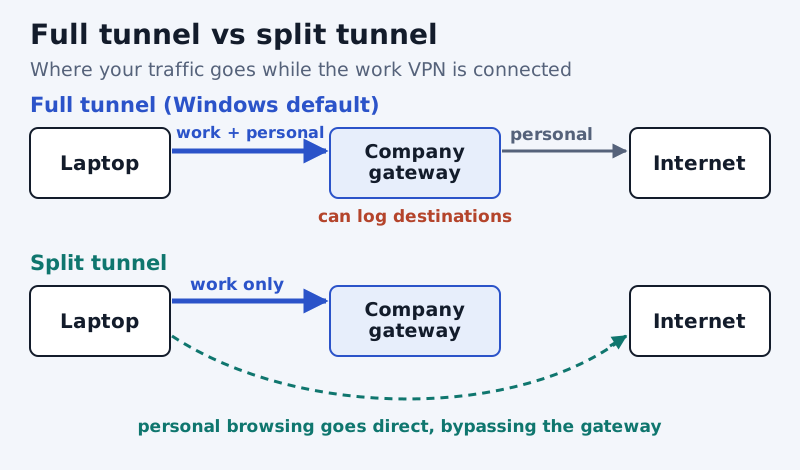
You can often check which one you have. On Windows, running route print with the VPN connected shows whether a 0.0.0.0 route points at the VPN adapter. A simpler test is to look up your public IP address with and without the VPN: if it changes to an address belonging to your employer, your web traffic is going through the company. Our split tunneling brief covers why IT teams choose each mode.
What the VPN gateway can record
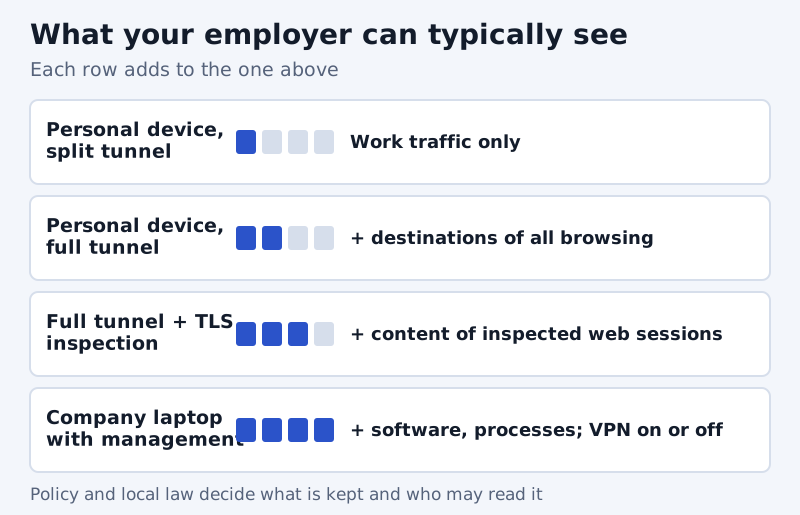
Whatever enters the tunnel arrives at the company's gateway or firewall, which sits in a position to log it. In every deployment the gateway knows who connected, when, from which public IP address and for how long. For traffic inside the tunnel, it can see destination addresses and, when the company's DNS servers answer your lookups, the names of the sites you request. With HTTPS, it normally sees the site you reach but not the pages or what you type, unless the company also inspects encrypted traffic.
How much of this is stored, for how long and who may read it are policy decisions, not technical limits. Your employer's acceptable-use and monitoring policies, and the law where you work, set those rules; the gateway only makes the data available.
TLS inspection: when HTTPS isn't private from work
Some organisations decrypt outbound HTTPS to scan it for threats. Palo Alto Networks calls this SSL Forward Proxy: its documentation says the firewall becomes "a trusted third party (proxy) to the session between the client and the server", presenting your browser with a copy of each site's certificate signed by a certificate the firewall controls. Once that works, the firewall can read the content of web sessions it is set to decrypt, not just the site name.
It only works if your device trusts the firewall's signing certificate. Palo Alto's documentation recommends using a certificate issued by the company's own certificate authority precisely because managed devices usually trust that authority already, so nothing new has to be deployed. A self-signed certificate, by contrast, has to be installed on every device. On a personal device that doesn't trust the company's certificate, an inspected site would show certificate warnings, which is a visible sign. On a company laptop you will see nothing unusual, so assume inspection is possible there.
Your device can reveal more than the VPN
Disconnecting the VPN alters the network's view; software on the device keeps reporting regardless. Management tools are the bigger factor on a work-issued laptop. Microsoft's Intune help page for employees is unusually direct about the limits of device management: an organisation can't see your calling and web browsing history, email and text messages, contacts, calendar, passwords, photos or the content of documents you create. It can always see the device owner, name, serial number, model, manufacturer, operating system version and IMEI.
The same page draws a clear line between personal and corporate-owned devices. On personal devices the organisation sees only the managed app inventory, and it can't view the device's location. On corporate-owned Windows devices it can query hardware and operating system details, installed certificates, file paths and names, user and group information, registry and event log entries and details about running processes. Microsoft also notes that some configurations let organisations see more than the managed app inventory on a personal device, so ask IT what yours collects. And remember that Intune's "can't see browsing history" describes device management; it says nothing about what a full-tunnel VPN or a web proxy logs on the network.
Should you use a corporate VPN for personal browsing?
The cautious answer is no. On a full tunnel your personal browsing passes through the company's gateway and is subject to its logging and filtering. On a company laptop it is also subject to whatever the device reports. Keep personal browsing on a personal device and a personal connection. If you need privacy on hotel or café Wi-Fi for personal use, use your own device with your own VPN, not the work tunnel.
Don't run a consumer VPN on a work laptop alongside the corporate one either. Both want to control routing and DNS, so one usually breaks the other, and installing it may breach your employer's policy. The same clash comes up with vendor clients, which we describe in our GlobalProtect brief.
For IT teams: tell people what you can see
Employees who understand the setup make better decisions, and a short, specific statement beats a vague "all activity may be monitored". Say whether the VPN is full or split tunnel, whether TLS inspection runs and for which categories, what device management collects on personal versus corporate devices, and how long logs are kept. If your remote-access design is due for review, our briefs on always-on VPN and zero trust vs VPN cover the main alternatives. Teams without a firewall estate sometimes use a managed service such as NordLayer instead; that is an affiliate link (see our affiliate disclosure), so judge it on identity integration and logging terms like any other option.
Edge cases
- Always-on configurations reconnect by themselves, and some block internet access entirely until the VPN is up. That is policy, not a fault.
- Personal phones with a work profile: on Android work profiles, Microsoft says the organisation sees only apps inside the work profile.
- Video calls and some cloud apps may be split out of the tunnel on purpose, so a call may not pass through the company gateway even on an otherwise full tunnel.
- Leaving the VPN connected after work hours on a full tunnel keeps routing your evening browsing through the company.
Corporate VPNs: frequently asked questions
What is a corporate VPN?
Can my employer see my browsing history on a work VPN?
Can my employer see what I do when the VPN is off?
How do I know if my work VPN is full tunnel or split tunnel?
Is a corporate VPN the same as a personal VPN?
Start with the business VPN guide, or read how IPsec VPNs work in detail.